


What Is a Digital Conference System
Data:June 12, 2026 Author:
 Home
HomeA digital conference system is an interconnected network of audio, video, and data hardware designed to manage, control, and facilitate communication during meetings, conferences, and large-scale assemblies.
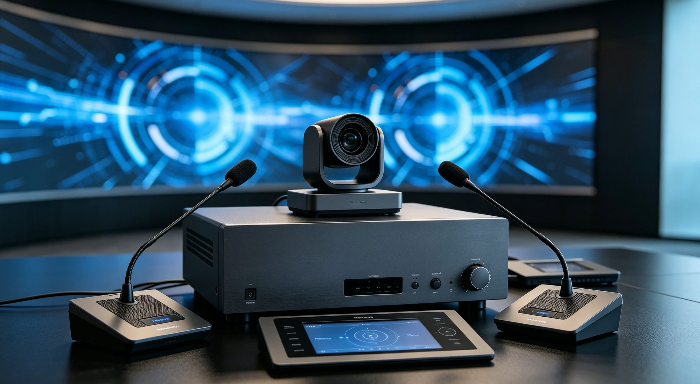
Unlike a basic sound setup that simply routes individual microphones into a central mixer, a digital conference system treats every microphone position as an intelligent endpoint. These systems utilize digital signal processing (DSP) to automate audio levels, manage speaker queues, handle voting sessions, distribute multiple languages, and interface directly with video conferencing software and automated cameras.
In short, it transforms a collection of individual audio parts into a unified, managed, and automated meeting environment.
The Evolution from Analog to Digital
Understanding where digital conference systems stand today requires looking at the limitations of the traditional analog setups that preceded them.
-
The Analog Era (Point-to-Point Complexity): Traditional analog systems relied on separate, thick XLR cables running from every single microphone back to a central mixing board. If a boardroom had 30 seats, 30 individual cables had to be routed through walls or under floors. Controlling who could speak required a human technician manually pushing faders up and down on a mixing console. Audio quality degraded over long cable distances, and the systems were highly susceptible to electromagnetic interference (humming and buzzing) from lights and nearby electronics.
-
The Digital Shift (Networked Intelligence): The transition to digital technology replaced bulky point-to-point wiring with simple, lightweight network cables (like Cat5e or Cat6) or secure wireless signals. Instead of sending raw electrical voltage, a digital system converts sound into data packets right at the microphone head. This allows multiple channels of audio, control commands, voting data, and power to travel along a single cable. It also moved the control from manual mixing boards to automated software logic within a central controller.
Why Modern Meeting Rooms Need It
Modern business and government operations move too fast for the technical friction of old-school audio setups. Digital conference systems have become essential infrastructure for several practical reasons:
-
Eliminating Meeting Chaos: In large meetings, people naturally talk over one another. Digital systems enforce order through pre-set microphone modes. For example, a system can be configured to allow only three microphones to be active at once. If a fourth person wants to speak, they press a button to enter a digital queue, waiting their turn automatically without interrupting the flow.
-
Flawless Hybrid Integration: Remote work and hybrid meetings are standard. Standard microphones often pick up room reflections, paper rustling, and HVAC noise, which sounds terrible on a Zoom or Microsoft Teams call. Digital conference systems use targeted gooseneck microphones and onboard digital processing to isolate the speaker's voice, cancel echoes, and deliver clean, intelligible audio to remote participants.
-
Automation Reduces IT Overhead: A fully digital system automates tasks that used to require a dedicated AV technician. It can automatically track who is speaking and point a robotic PTZ (Pan-Tilt-Zoom) camera at them, manage acoustic feedback before it turns into a screech, and log attendance or vote counts instantly. This allows teams to walk into a room, start a meeting, and focus entirely on the agenda rather than troubleshooting the hardware.
Key Components of the System
A digital conference system is made up of a few specific hardware parts designed to work together on a single network, replacing the mess of traditional audio gear.
The Central Control Unit
The Central Control Unit (CCU) is the main hub of the entire room. It is usually tucked away in an AV cabinet or server rack and handles the heavy lifting.
-
Audio Control: It manages all the sound, automatically cutting out background noise and preventing loud microphone screeching without needing a separate mixing board.
-
Meeting Rules: This is where you configure how the meeting runs, such as limiting how many people can speak at the exact same time.
-
Main Connections: It connects the table microphones to the rest of the room's technology, like the main TV display, house speakers, or a Zoom/Teams system.
Chairman Units vs. Delegate Units
The individual units placed on the conference table are split into two types to keep meetings organized.
-
Delegate Units: Used by regular participants. They include a gooseneck microphone, a built-in speaker, and a single button to press when you want to speak. The built-in speaker turns off automatically when you talk, so it doesn't cause an echo.
-
Chairman Units: Used by the person running the meeting. It looks like a regular unit but has a "Priority" button. This lets the chairperson instantly mute everyone else to bring the room back to order or approve the next speaker in line.
Extension Hubs and Power Supplies
When a meeting room is exceptionally large or requires dozens of microphones, the system uses extra support pieces to keep things running smoothly.
-
Signal Boosters: Standard cables can only run so far before the signal drops. Extension hubs act as boosters to carry data across large auditoriums.
-
Extra Power: Running dozens of desktop microphones, lights, and small speakers takes a lot of electricity. Supplementary power units inject steady power into the cables so the system doesn't randomly shut down mid-meeting.
How Audio and Video Are Handled
In a modern conference system, audio and video usually work together instead of operating separately. Once someone speaks into the microphone, the system processes the sound, distributes it to speakers, and can also send it to remote participants or recording devices at the same time.
For larger meeting rooms, the system often connects with cameras, displays, and video conferencing platforms so both in-room and online participants can communicate more naturally.
Clear Sound and Feedback Control
One of the biggest challenges in conference rooms is audio feedback and echo, especially when multiple microphones are active.
Modern conference systems reduce this problem through automatic feedback suppression and audio processing. The system adjusts microphone sensitivity, filters background noise, and keeps voices clearer during discussions.
As a result, meetings sound more natural and require less manual adjustment from operators.
Automatic Camera Tracking (PTZ)
Many conference systems now support PTZ cameras with automatic speaker tracking.
When a participant speaks, the camera can automatically turn and focus on that person without manual control. This is especially useful for boardrooms, government meetings, and hybrid conferences where remote attendees need to clearly see who is talking.
It also helps meetings feel more organized and professional during video calls or recordings.
Recording and Archiving Meetings
Some conference systems also include recording and archiving functions, which are useful for meeting reviews, training, or compliance purposes.
Depending on the setup, audio and video files can be stored locally or uploaded to a server for future access. This makes it easier for organizations to keep meeting records without needing separate recording equipment.
Main Types: Wired vs. Wireless Systems
Most conference systems today are either wired or wireless, and both have their own place depending on the meeting environment.
Some projects care more about stability. Others care more about flexibility and installation speed. That’s usually where the difference starts.
Wired Systems
Wired systems are still very common in fixed meeting rooms and government projects.
Because everything is connected physically, the audio tends to stay more stable, especially during long meetings or multi-speaker discussions. Signal interference is also less of a concern compared with wireless setups.
The downside is installation. Cable routing can take time, and changing the room layout later is not always convenient.
Still, for places that use the room every day, wired systems are often the safer long-term choice.
Wireless Systems
Wireless systems are more popular in spaces where flexibility matters.
There’s no need to run cables across the table, so the room looks cleaner and setup is much faster. This is useful for hotels, training rooms, temporary conferences, or multi-purpose spaces where layouts change frequently.
Of course, wireless systems also depend more on signal conditions. In crowded environments with many wireless devices nearby, stability can sometimes be affected.
But for many modern meeting spaces, the convenience is worth it.
Hybrid Deployments for Large Venues
Large conference venues often don’t rely on only one system anymore.
A common approach is keeping the core equipment wired while using wireless microphones in temporary seating areas or overflow sections. It gives the project more flexibility without completely sacrificing stability.
That’s why hybrid systems are becoming more common in convention centers, universities, and larger government meeting spaces.
Core Features for Structured Meetings
In smaller meetings, a simple microphone setup is usually enough. But once more people join the discussion, meetings can easily become noisy or difficult to manage. That’s where conference system features start becoming important — not just for audio, but for keeping the entire meeting organized.
Microphone Management Modes
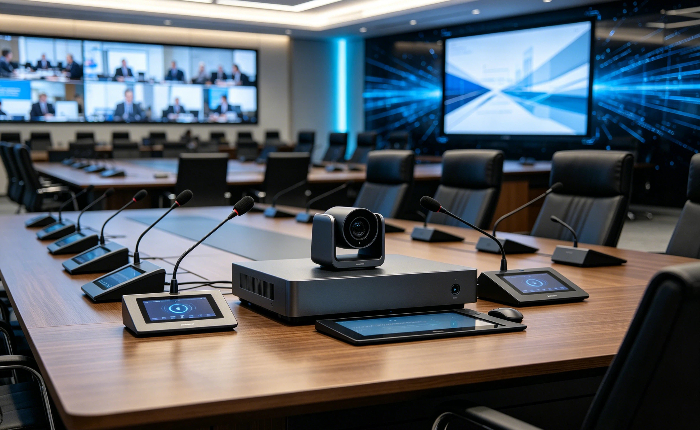
One of the most commonly used functions is microphone control.
Instead of leaving every microphone active all the time, the system can limit how many people are allowed to speak simultaneously. This helps reduce overlapping conversations and keeps the discussion clearer.
Some common control modes include:
-
FIFO mode — the first microphone activated is the first one closed
-
Chairman priority mode — the chairman can interrupt or mute delegate units
-
Request-to-speak mode — participants wait for approval before speaking
In formal meetings, these small controls make discussions feel much more structured.
Electronic Voting and Tallying
Many conference systems now include built-in voting functions, especially in boardrooms, councils, and government meetings.
Instead of raising hands or counting manually, participants can vote directly from their conference units. The system then calculates the results automatically.
Typical voting types include:
-
Yes / No / Abstain
-
Multiple-choice voting
-
Attendance tallying
For larger meetings, this saves time and also makes record keeping much easier afterward.
Simultaneous Interpretation for Multi-Language Events
Language support becomes essential once international participants are involved.
With simultaneous interpretation, interpreters translate the discussion in real time while attendees listen through headphones using their selected language channel. The meeting continues normally without constant pauses for translation.
This setup is common in:
-
International conferences
-
Government forums
-
Diplomatic meetings
-
Global corporate events
For multilingual events, it makes communication much smoother and keeps the meeting flow more natural.
Common Application Scenarios
Corporate Boardrooms and Meeting Rooms
In corporate environments, conference systems are widely used for daily meetings, strategic discussions, and hybrid collaboration between on-site and remote teams. The focus is on making communication as smooth and efficient as possible, without adding operational complexity.
Most companies prefer systems that are easy to use, quick to start, and stable during long meetings. Clear audio quality and seamless video conferencing integration are usually the most important factors, especially in fast-paced decision-making environments.
Key Requirements
| Aspect | Description |
|---|---|
| Audio Performance | Clear voice capture with effective noise reduction |
| System Operation | Simple and intuitive control interface |
| Integration | Compatible with mainstream video conferencing platforms |
Government and Legislative Assemblies
International summits and large convention venues represent the most complex application scenario. These events usually involve large audiences, multiple languages, and highly coordinated event workflows.
The system must support high-density audio distribution and real-time interpretation without delays or signal loss.
Common requirements include:
- Large-scale simultaneous interpretation systems
- Multi-zone audio distribution
- Centralized event management and scheduling
- High-capacity, stable AV infrastructure
International Summits and Convention Centers
International summits and large convention venues represent the most demanding application scenario. These events often involve large-scale audiences, multiple languages, and highly coordinated event schedules.
The system must be capable of handling high-density audio distribution while maintaining clarity and stability across all zones. Simultaneous interpretation and centralized control are also essential to ensure smooth communication among international participants.
Core System Requirements
Major Benefits of Going Digital Conference System
Modern digital conference systems are replacing traditional setups in corporate, government, and large meeting environments. They make meetings easier to manage while improving efficiency and security.
Simplified Cable Management
A key benefit of a digital conference system is reduced wiring complexity. Instead of multiple analog cables, most devices run on a single network connection.
This makes installation faster, keeps meeting rooms cleaner, and reduces maintenance issues. It’s especially useful in large conference rooms where system layout can get complicated.
Enhanced Meeting Efficiency and Control
A digital meeting system helps organizers manage meetings more easily from a central interface. Microphones, speakers, and meeting settings can all be controlled in one place.
This leads to smoother discussions and fewer interruptions. It also works well for hybrid meetings where remote participants need to join without delays or setup issues.
Better Security and Encryption
Security is another major advantage of a secure conference system. Digital transmission allows encrypted communication, which helps protect sensitive meeting content.
This is important for government meetings, corporate boardrooms, and any situation where confidential information is discussed. It ensures data stays protected throughout the entire meeting.
summary
Digital conference systems today are no longer just basic meeting tools. They combine audio, video, control, and communication functions into one integrated solution, making meetings more organized, efficient, and reliable across different environments—from corporate boardrooms to government halls and large international events.
Based on this idea, creator1997 organizes and presents digital conference system knowledge in a clear and structured way, helping users understand the system from basic concepts to real-world applications and key benefits.
FAQ
Where are digital conference systems commonly used?
They are widely used in government institutions, corporate boardrooms, conference centers, parliaments, universities, and international organizations.
Can a digital conference system support simultaneous interpretation?
Yes. Many digital conference systems support multi-language simultaneous interpretation for international meetings and multilingual events.
How many microphones can a digital conference system support?
The number depends on the system design. Small systems may support dozens of units, while large systems can support hundreds or even thousands of conference microphones.
What is the difference between a digital conference system and an analog conference system?
Digital systems offer higher sound quality, better scalability, stronger anti-interference capability, and more advanced management functions than analog systems.
Previous
How to Choose the Right Conference System for a Modern Meeting Room
Next
What Is a Conference System and How Does It Work


